Lab Assistant Knowledge Pipelines
n8n workflows that turn live data from LibreNMS, Graylog and the Synology NAS into always-current RAG knowledge for my self-hosted AI lab assistant.
- Stack
- n8nOpen WebUIOllamaREST APIsLibreNMSGraylogSynology DSM
Part of FSJ-LAB. Builds on Lab Automation with n8n and the local AI stack.
At a glance
| Goal | Keep my self-hosted Lab Assistant’s knowledge current without editing docs by hand |
| Stack | n8n · Open WebUI · Ollama (llama3.1:8b, nomic-embed-text) · REST APIs |
| Sources | LibreNMS · Graylog 7 · Synology DSM 7.3 · NAS backup share · Proxmox VE (planned) |
| Environment | Fully air-gapped homelab: no cloud services, everything runs locally |
| Status | 4 of 5 collectors live and refreshing on schedule |
The problem
My lab assistant answers questions about FSJ-LAB using retrieval-augmented generation (RAG) over a knowledge base of hand-written docs. Those docs describe how the lab was designed, but not what is true right now. They drift the moment something changes, and an assistant answering “current state” questions from stale docs will confidently give wrong answers.
I wanted the assistant to answer questions like “Is Graylog healthy?” or “How full is the NAS?” from data that refreshes itself.
Architecture
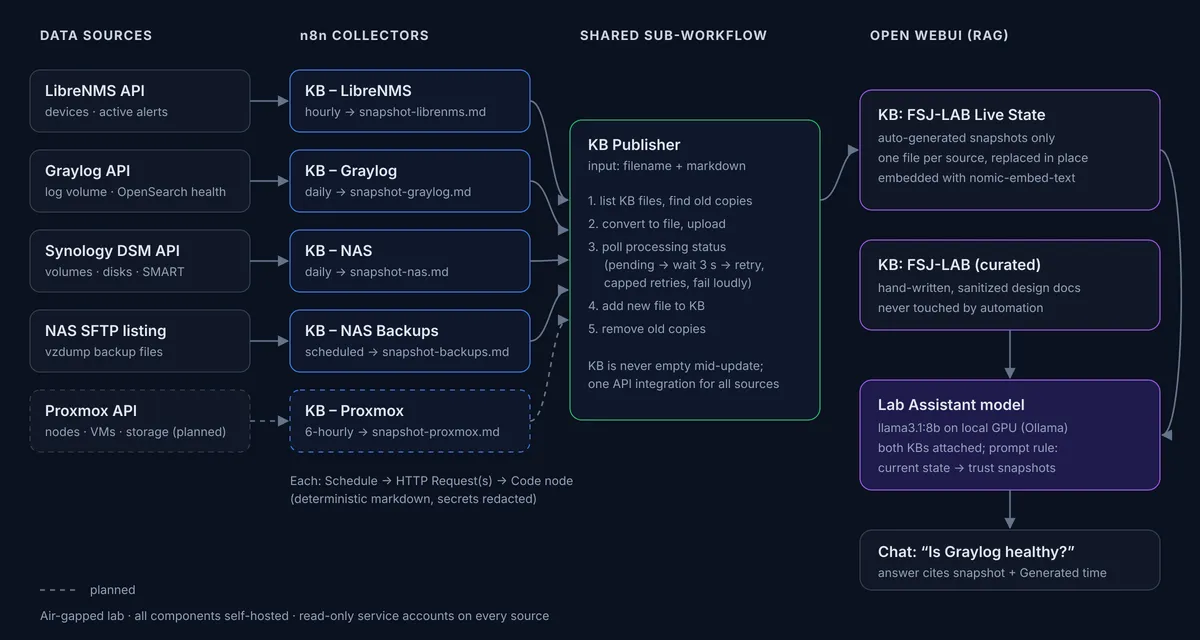
The diagram at the top of this page shows the full flow. Each data source gets a small collector workflow in n8n: a schedule trigger, one or more read-only API calls, and a Code node that turns the response into a markdown snapshot. Every collector hands its snapshot to one shared sub-workflow, the KB Publisher, which is the only piece that talks to Open WebUI.
| Collector | Source API | Schedule | Snapshot covers |
|---|---|---|---|
| KB – LibreNMS | LibreNMS REST API | Hourly | Every monitored device, up/down state, active alerts, device rosters by type and OS |
| KB – Graylog | Graylog 7 Scripting + System APIs | Daily | Log volume per source, OpenSearch cluster health, input states, system notifications |
| KB – NAS | Synology DSM Web API | Daily | Volumes, storage pools, disk health/SMART/temperature, utilization, shared folders, config risks |
| KB – NAS Backups | SFTP listing of the backup share | Scheduled | Latest Proxmox vzdump backup per VM |
| KB – Proxmox | Proxmox VE API | Every 6 h | Nodes, VMs, storage (planned) |
Design decisions
Two knowledge bases, not one. Automation writes only to an FSJ-LAB Live State knowledge base. My curated, hand-sanitized docs live in a separate knowledge base that automation never touches. The pipeline can replace files freely with zero risk to the docs I wrote by hand.
One file per source, replaced in place. Each collector always publishes the same filename (for example snapshot-nas.md). The Publisher swaps the old copy for the new one, so the assistant never retrieves three days of conflicting snapshots.
A shared Publisher sub-workflow. Upload, processing and replacement logic lives in exactly one place. When Open WebUI changed its API between releases, I fixed one workflow instead of five.
Deterministic markdown, not LLM summaries. Snapshots are built by plain JavaScript in n8n Code nodes. Letting a small local model summarize the data would risk inventing facts and writing them into the knowledge the assistant trusts.
Formatted for retrieval, not for humans. RAG splits documents into chunks, and a table row separated from its header loses its meaning. So every device, disk and alert is one self-contained sentence that names itself. Each snapshot also includes:
- a
Generated:timestamp, so answers can say how fresh they are - compact roster lines that list every item in one chunk, so “list all…” questions don’t come back half-complete
- explicit scope statements (“if a device is not listed, LibreNMS does not monitor it”) that stop the model from filling gaps with guesses
Fail loudly, never publish garbage. Every Code node validates its input: zero devices, an API error, or a request that returned the wrong shape of data throws an error instead of overwriting a good snapshot with a bad one.
The KB Publisher
The Publisher takes two inputs, filename and markdown, and runs:
- List the knowledge base’s files and record any existing copies of this filename
- Convert the markdown to a file and upload it
- Poll the processing status. Open WebUI extracts and embeds uploads in the background, so the workflow loops (wait 3 s, check, repeat) until the status is
completed, with a retry cap so a stuck upload can’t loop forever - Add the processed file to the knowledge base
- Remove the old copies, only after the new one is in place, so the knowledge base is never empty mid-update
A Switch node routes the three possible outcomes: completed continues, failed stops with an error, and anything else goes to the retry loop.

A successful run of the KB Publisher in n8n. The main line uploads the snapshot and waits for processing; the Switch sends completed files to the top branch (add the new copy, then remove the old one), and the lower loop retries while Open WebUI is still processing.
Security
- Read-only service accounts on every source. LibreNMS global-read user, Graylog Reader role, Proxmox
PVEAuditortoken with privilege separation, and a dedicated DSM account with no shared-folder access and every app denied except DSM. - Secrets stay in n8n’s encrypted credential store, never in workflow JSON.
- Field whitelisting. The LibreNMS device API returns SNMP community strings and SNMPv3 credentials for every device. The snapshot code copies only safe fields, so those values can never reach the knowledge base.
- Redaction. Log-derived text passes through a filter that masks anything resembling a password, token, key or community string.
- API session hygiene. The DSM workflow logs out at the end of every run instead of leaving sessions open.
Troubleshooting log
Most of the learning happened here. A few of the problems I worked through:
| Symptom | Root cause | Fix |
|---|---|---|
| Duplicate snapshots piling up | In Open WebUI v0.9.5, the knowledge-base endpoint returns files: null; files moved to a separate paginated endpoint |
Verified every endpoint with curl first, then rebuilt the Publisher around the new /files endpoint |
| Workflow “succeeded” but the file never appeared | The Switch node had a rule literally matching the text “Fallback” instead of the built-in fallback output, so pending items were silently dropped |
Enabled the real fallback output and wired it into a capped retry loop |
| Code node said a node “hasn’t been executed” | Parallel fan-out: n8n runs a multi-input node once per branch, before the other branches finish | Rewired every collector as one straight chain |
| Graylog “volume” showed timestamps instead of counts | The request hit the messages endpoint, not the aggregate endpoint | Added a schema check that fails if the response has no metric column |
| Graylog 400s on GET health endpoints | Settings carried over when the node was copied from a POST node | Rebuilt the nodes with n8n’s Import cURL from a request already proven with curl |
| DSM errors 101 and 103 | The credential’s form body replaced the API parameters; a session ID ended up in the method field |
Sent credentials as query parameters and API fields in the body; separated login from data calls |
| Assistant listed 5 of 8 VMs and added one that doesn’t exist | The device list was split across RAG chunks, and the model mixed in an old hand-written doc | Added one-line rosters to each snapshot, plus a system prompt rule to use only snapshot lists for current state |
My method throughout: test the API with curl from the same host n8n runs on before building the node. That one habit turned vague n8n errors into precise, fixable ones.
Results
The assistant now answers current-state questions from live data, cites the snapshot it used, and reports when that snapshot was generated.
The pipeline also surfaced real issues in the lab that I hadn’t noticed:
- two VMs and both Proxmox nodes weren’t being monitored by LibreNMS at all
- one access switch had stopped sending syslog to Graylog
- the OpenSearch cluster was yellow because index replicas were set above zero on a single node
- the NAS had no disk redundancy and was pointed at an NTP server it can’t reach from the air-gapped lab
Skills demonstrated
- Workflow automation: n8n sub-workflows, scheduling, loops, error routing, input validation
- API integration: REST APIs for LibreNMS, Graylog, Synology DSM, Proxmox and Open WebUI; session and token auth
- AI/LLM operations: RAG design, chunk-aware document formatting, grounding and hallucination control, local model hosting
- Security: least-privilege service accounts, secret handling, data sanitization
- Troubleshooting: systematic isolation with curl, reading API errors, verification-first changes
What’s next
- KB – Proxmox collector for node, VM and storage inventory
- Error-handling workflow that alerts when any collector fails, so stale snapshots never go unnoticed
- Live tools: let the assistant query APIs on demand (Open WebUI Tools / MCP) with human approval for anything that changes state
- Vector store migration: move embeddings into Supabase pgvector for more control over retrieval